



Request a Demo
Request a Demo

e-Prescribing in Luma MDX

Luma MDX enables electronic prescribing for authorized clinicians as part of a modern, mobile-friendly clinical workflow.
Request a Demo
Use case for e-prescribing

E-prescribing helps practices reduce delays, improve accuracy, and streamline coordination with pharmacies by sending prescriptions electronically rather than by paper or phone/fax. It supports routine outpatient prescribing as well as specialty practice needs.

Prescriber choice of medication and patient choice of pharmacy
  • The prescribing clinician independently selects the medication, including dose, route, quantity, directions, and refills based on clinical judgment and the patient’s needs. Luma MDX does not direct, substitute, or alter prescriber decision-making.
  • The patient selects their preferred pharmacy. Prescriptions are transmitted electronically to the pharmacy chosen by the patient.
How It Works
1. Prescriber initiates a prescription within the patient record

From the Patient Details page, the prescriber can begin the e-prescribing workflow by selecting “Add Prescription.” All prescribing actions are performed within the patient’s record, ensuring accurate demographic, allergy, and medication history data are incorporated into the prescription process.

2. Prescriber selects medication and prescribing details

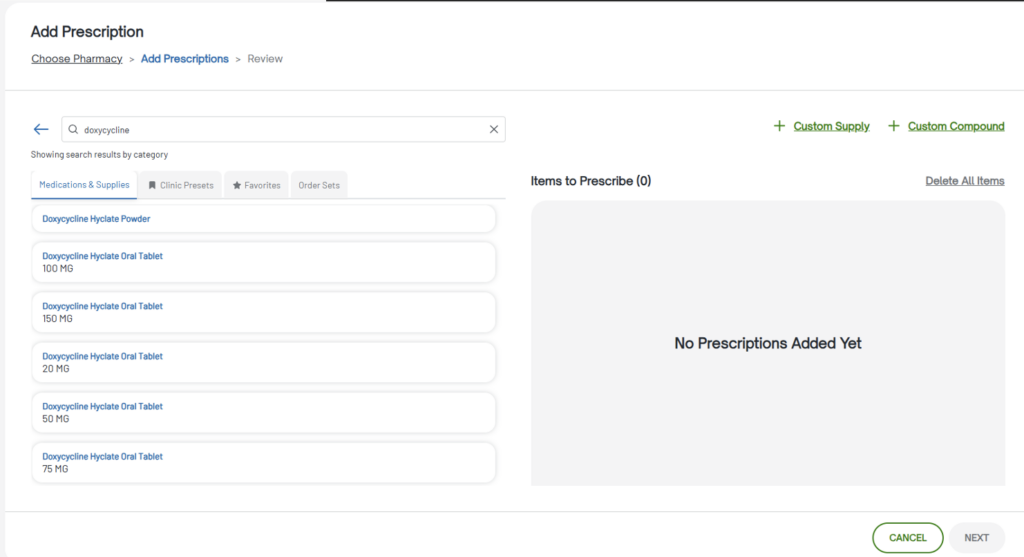
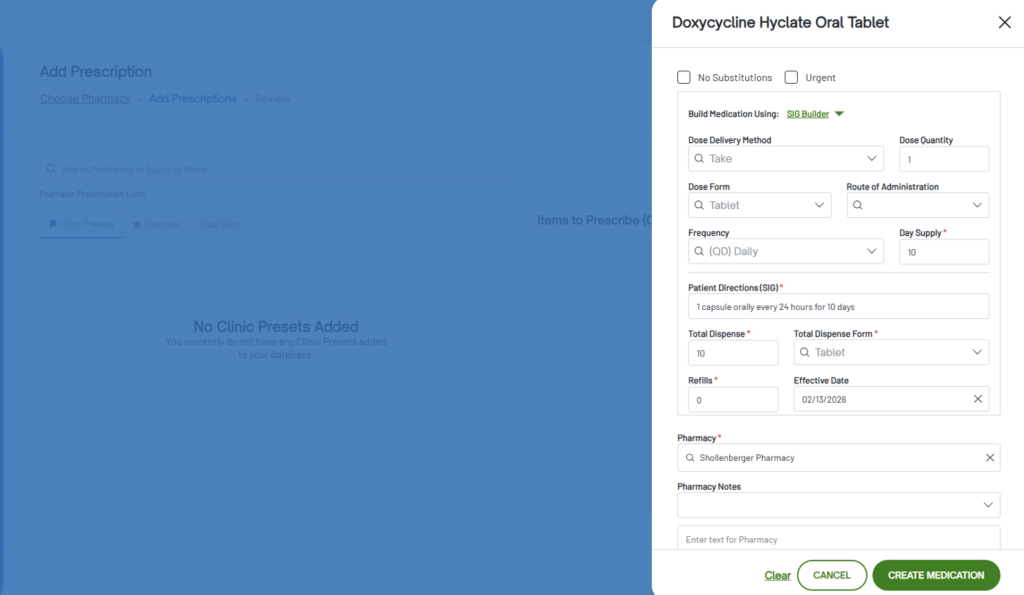
The prescriber searches for a medication using an autocomplete drug database. Once selected, they enter required prescribing details such as dosage, directions (SIG), quantity, refills, days supply, substitution preferences, and pharmacy notes. Clinical decision support automatically checks for drug–drug and drug–allergy interactions during this process.

3. Patient selects preferred pharmacy (or confirms existing preference)

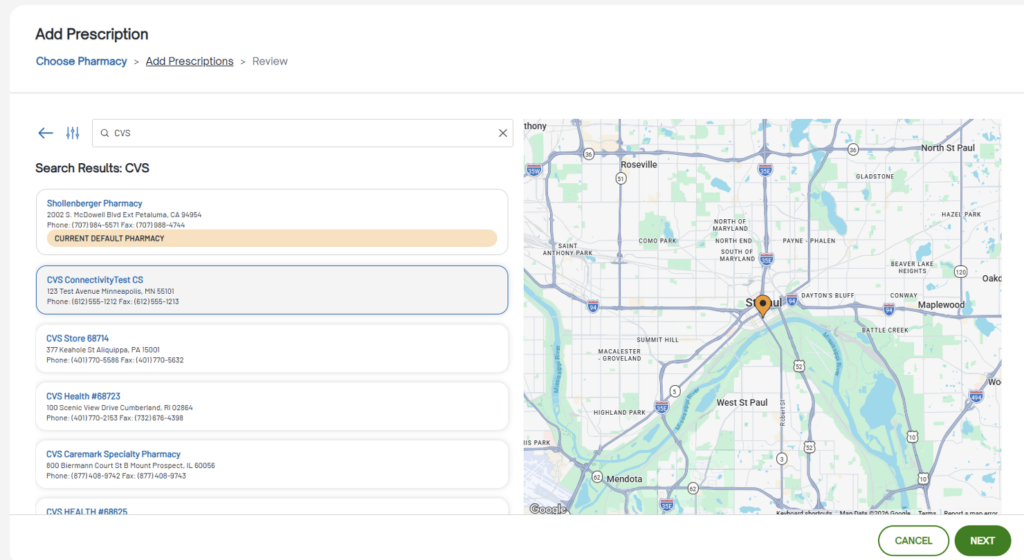
The prescriber can select a pharmacy for the prescription or use the patient’s saved default pharmacy. Pharmacies can be searched by name, address, or phone number, and the patient’s preferred pharmacies can be managed within their profile.

The prescriber retains the ability to change the pharmacy before sending.

4. Prescriber reviews and signs

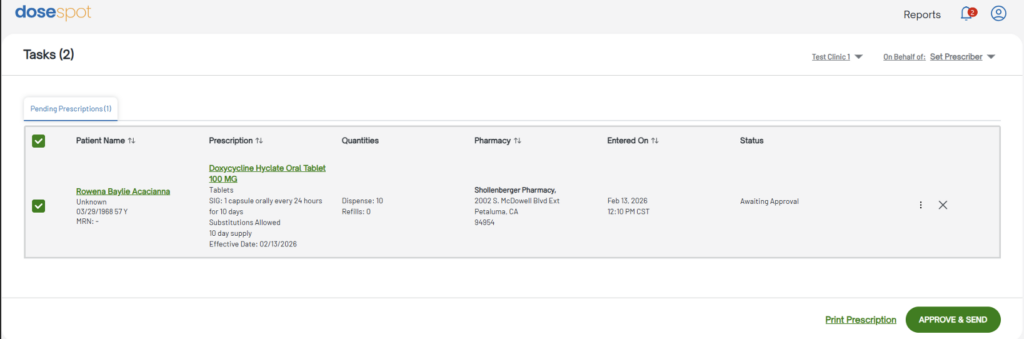
Before transmission, the prescriber reviews all prescription details. For controlled substances (EPCS), identity proofing and PIN verification are required. If configured, the system may require acknowledgment of drug interaction alerts prior to signing.

5. Prescription is transmitted electronically to the selected pharmacy

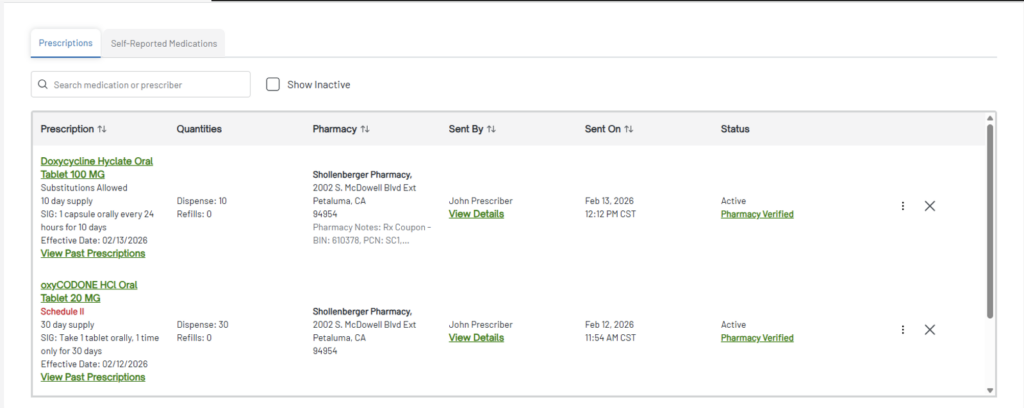
Once approved and signed, the prescription is securely transmitted electronically (NewRx) to the selected pharmacy. The prescription then moves from the Pending list to the active Prescriptions list.

Status updates reflect transmission progress.

6. Practice can view transmission status and history as available

The prescribing team can track prescription status, including transmission progress, pharmacy verification, refill requests, and any transmission errors. Status history is available within the patient’s record and Dashboard.

Pharmacy Connectivity

Luma MDX connects to pharmacies through certified e-prescribing network partners (including DoseSpot and related network services where applicable). Luma MDX is not a pharmacy and does not receive payments from pharmaceutical manufacturers to influence prescribing decisions.

Compliance & security

E-prescribing workflows are designed to support privacy and security expectations for healthcare organizations.

See Trust & Security for our encryption and access controls.